¶ Veeam Windows Agent Installation
To install Veeam Agent for Microsoft Windows:
-
Download the setup archive for Standalone Veeam Agent for Microsoft Windows from https://dev.networkplatforms.co.za/veeam/VeeamAgentWindows.exe and save it on the computer where you plan to install the product.
-
Double-click the downloaded setup archive. In the open archive, double-click the setup file to launch the installation wizard and click Next.
-
Click I Accept to accept license agreements and install Veeam Agent for Microsoft Windows.
-
Launch Veeam agent for Windows from Start Menu.
-
Cancel the licence installation. The licence will be installed automatically from the backup server
-
Launch the New Backup Job wizard or add a new Job.
-
Specify the job name and description then click next.
-
Select the the preferred backup mode.
-
Specify backup scope for volume level or file level backups.
-
Select Veeam backup repository as the destination.

-
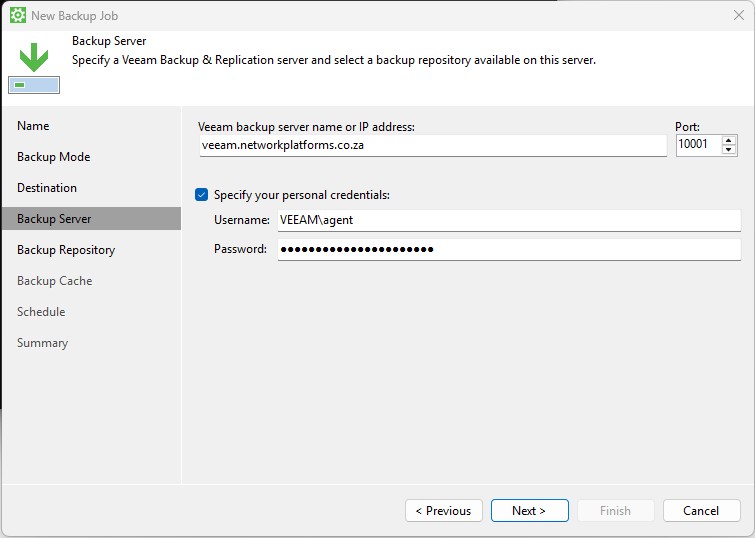
Specify the server and credentials as below
-
Server name : veeam.networkplatforms.co.za
Username : VEEAM\agent
Password : RegistrationSecret123#
-
Select JB1-NAS3-Vault as the Back Repository and define your preferred retension period.Specify advanced backup settings if required.

-
Specify backup cache settings if required.
-
Specify guest processing settings.
-
Specify the preferred backup schedule.
-
Review backup job settings.
-
Click Finish